AI outreach personalization

AI Outreach Personalization for LinkedIn Messages, Cold Emails, and Follow-Ups

Neebify helps B2B teams create more relevant LinkedIn outreach messages, cold emails, and follow-ups using prospect details, company context, role, industry, region, tone controls, fallback lines, and message quality checks.

7-day free trial · No credit card · Built for human-paced outreach workflows

Write outreach that feels more relevant, more specific, and easier to review before launching LinkedIn + email campaigns.

Quality checks
Fallback lines
Human approval
Example personalization workflow Sample message data
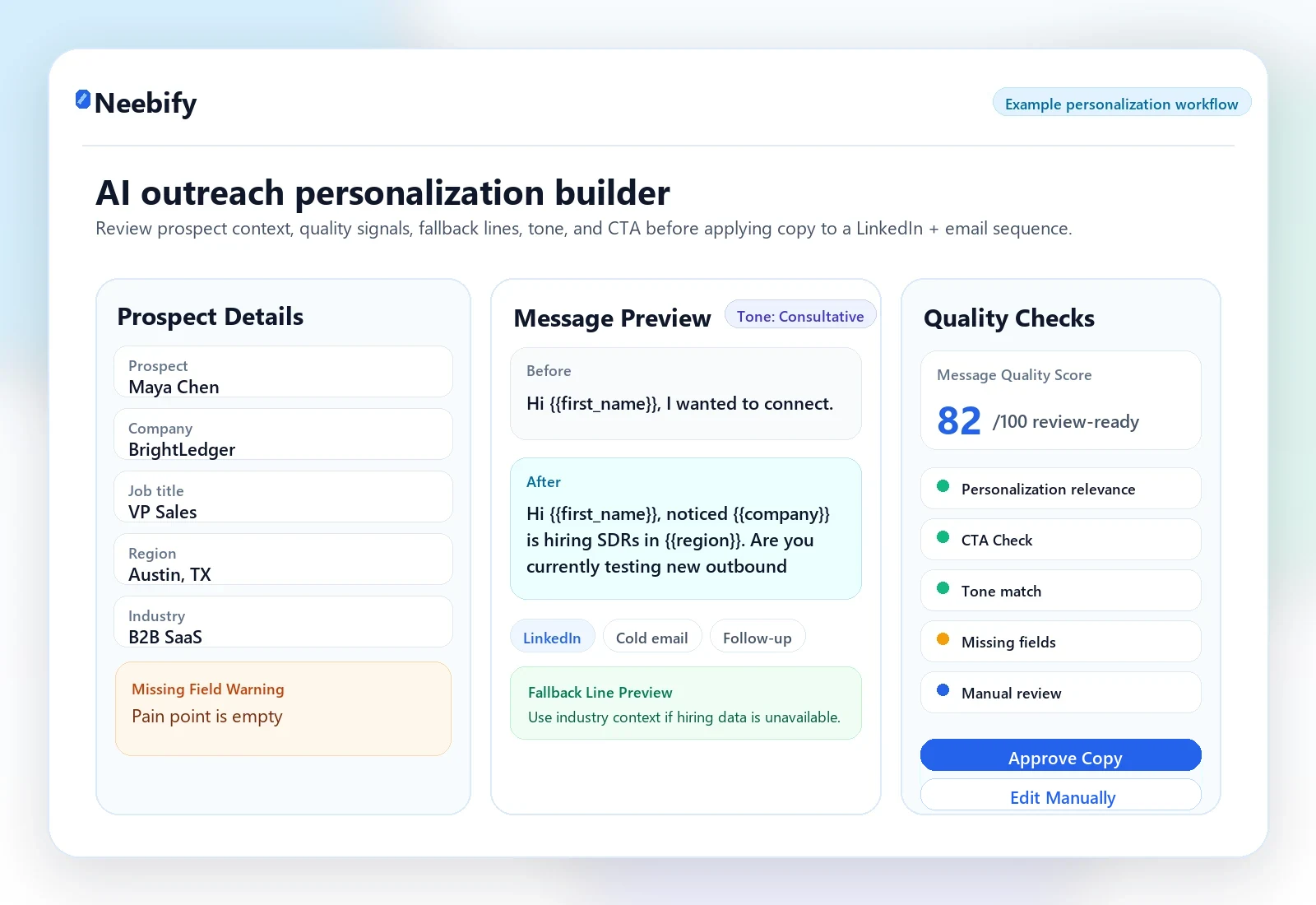
Neebify AI outreach personalization workflow for LinkedIn messages, cold emails, and follow-ups

Review prospect context, message quality score, missing field warnings, fallback line preview, tone selector, CTA check, and sequence approval in one workflow.

Before and after

Turn Generic Outreach Into Messages That Feel Relevant

Neebify helps teams move beyond generic first-touch messages by using prospect and company context to create more specific LinkedIn connection messages, cold emails, and follow-ups.

See Personalization Workflow in a Demo
Before

Hi {{first_name}}, I wanted to connect.

After

Hi {{first_name}}, noticed {{company}} is hiring SDRs in {{region}}. Are you currently testing new outbound workflows?

Use company, role, hiring, industry, region, and campaign context to make outreach feel more relevant before your team sends it.
Personalization controls

Personalization Controls Built for Real B2B Outreach Teams

Neebify gives teams practical controls to create, review, and improve personalized outreach before campaigns go live. Use AI assistance to draft more relevant messages while keeping human review, tone, fallback copy, and CTA quality visible.

01

Message Quality Score

Review outreach messages before launch with a quality score based on relevance, clarity, personalization, and CTA strength.

02

Missing Field Warning

Flag missing prospect or company fields before personalization is applied, such as company name, role, industry, region, or pain point.

03

Fallback Line Preview

Preview backup message lines when certain personalization fields are unavailable, so outreach does not look broken or unfinished.

04

Tone Selector

Choose the tone that fits the campaign, such as professional, friendly, concise, consultative, direct, or founder-led.

05

CTA Check

Review whether the message includes a clear, low-friction next step, such as asking a relevant question or suggesting a short call.

06

Message Preview

Preview LinkedIn connection messages, cold emails, and follow-ups before activating the campaign.

Workflow

How Neebify AI Outreach Personalization Works

Build more specific outreach copy by combining prospect details, campaign intent, tone controls, message previews, and human approval before the sequence goes live.

See AI Personalization in a Demo
Step 1

Import or Select Your Prospects

Upload lead lists, select campaign segments, and prepare prospect details such as name, company, role, industry, region, and campaign goal.

Step 2

Add Personalization Inputs

Use available company context, role details, industry signals, hiring signals, pain points, or custom notes to guide message creation.

Step 3

Generate Message Variants

Create LinkedIn connection messages, cold emails, and follow-ups based on campaign objective, prospect context, and selected tone.

Step 4

Review Quality and Missing Fields

Check message quality score, missing field warnings, fallback line preview, CTA clarity, and personalization accuracy before launch.

Step 5

Approve and Launch Campaign

Approve messages, apply them to the outreach sequence, and launch the campaign with human-paced sending settings.

Builder UI

A Review Workspace for Personalization Before Launch

The personalization builder keeps important context and review controls visible, so teams can improve copy before applying it to an outreach sequence.

Prospect details panel
Company context panel
LinkedIn message preview
Cold email preview
Follow-up preview
Manual edit option
Visible review labels
Message Quality Score Missing Field Warning Fallback Line Preview Tone Selector CTA Check Preview Message Regenerate Message Approve Copy Edit Manually Apply to Sequence
Quality review

Review Message Quality Before You Launch Outreach

Neebify helps teams review outreach messages before they are used in campaigns. The message quality score makes it easier to identify weak personalization, unclear CTAs, missing context, or messages that need manual editing.

The score is a review tool. It helps improve message quality before sending, but it does not guarantee replies.

Personalization relevance
CTA clarity
Message length
Tone match
Missing fields
Fallback line availability
Industry relevance
Role relevance
Readability
Human review status
Use cases

Who Uses Neebify for AI Outreach Personalization?

B2B SaaS Founders

Create founder-led LinkedIn messages and cold emails that reference prospect role, company, industry, and campaign context.

Sales Teams

Help reps personalize outreach at scale while keeping message quality, tone, and CTA checks consistent.

Lead Generation Agencies

Create campaign-specific message variations for different clients, ICPs, industries, and offer types.

Recruiters and HR Teams

Personalize candidate outreach based on role, location, hiring context, and conversation goal.

Consultants and Service Providers

Write more relevant decision-maker outreach using company context, pain points, and professional tone controls.

Trust and control

AI-Assisted Personalization With Human Review

Neebify supports AI-assisted personalization without removing human control. Teams can review generated messages, edit copy manually, check missing fields, preview fallback lines, and approve messages before they are added to campaigns.

Human Review Before Launch

Approve or edit personalized messages before campaigns go live.

Fallback Copy Control

Avoid broken messages when a prospect field is missing.

Tone Consistency

Keep messaging aligned across reps, campaigns, and outreach channels.

CTA Visibility

Make sure every message has a clear, relevant next step.

Campaign Context

Create outreach copy based on campaign goal, ICP, role, industry, and prospect context.

FAQ

AI Outreach Personalization FAQ

What is AI outreach personalization?

AI outreach personalization helps teams create more relevant LinkedIn messages, cold emails, and follow-ups using prospect details, company context, role, industry, region, and campaign goals.

Can Neebify personalize both LinkedIn messages and cold emails?

Yes. Neebify helps teams personalize LinkedIn connection messages, LinkedIn follow-ups, cold emails, and email follow-up sequences.

What is a message quality score?

A message quality score helps users review outreach copy based on relevance, clarity, tone, personalization, CTA quality, and missing fields before launching a campaign.

What happens if personalization fields are missing?

Neebify shows missing field warnings and fallback line previews so messages do not appear broken or incomplete.

Can I choose the tone of outreach messages?

Yes. Neebify includes tone controls such as professional, friendly, concise, consultative, direct, and founder-led.

Does AI personalization guarantee more replies?

No. AI personalization is a message improvement and review tool. It can help teams write more relevant outreach, but results depend on targeting, offer, timing, list quality, and campaign execution.

Can agencies use Neebify for personalized outreach campaigns?

Yes. Agencies can use Neebify to create message variations for different clients, ICPs, industries, campaign types, and outreach goals.

Next step

Ready to Personalize LinkedIn + Email Outreach Without Losing Control?

See how Neebify helps your team create personalized LinkedIn messages, cold emails, follow-ups, fallback lines, tone variations, CTA checks, and review-ready outreach copy from one workspace.

7-day free trial · No credit card · Built for human-paced outreach workflows